


For the next four weeks, I will be offering four ideas that can help tackle screen time in the New Year. Each blog will have a manageable strategy that should not cause your kids to race out of the room. I think these strategies may actually be well-received by them!
I will share some helpful tips around screen time family agreements in February.
This week’s approach is around the idea of “ time to clean the screen.” This should involve everyone in the home and pertains particularly to phones and laptops, but other devices like Chromebooks and iPads are perfect for this as well.
The whole goal is to stay away from remarks about apps that suck up too much time or any other negative remarks but to make it as relaxed as possible. And definitely don’t go digging into anyone’s history tab.
I just did this with my family. It was fun and even led to some unexpected goodness. Let me explain….
I asked Peter and Tessa to join me on the couch with their phones and laptops — and I had mine too.
The first thing they asked me was, “OK, what are we doing and why?”
I responded, “New Year, new screen. We get to look and see if we want to do any house cleaning of apps on our desktops.”
We discussed the “why” a bit more, which was useful.
For Tessa, it turned out she did not have many apps on her phone screen, but they are searchable in the app store. She explained that she originally did this to make them less visible so they would not tempt her. She explained she liked having fewer apps on her phone screens and that there were none right now she wanted to get rid of.
Peter has way more apps on his phone than Tessa or me. When we first started, he said, “I don’t see the need to delete any of them.” But soon enough, he looked at his apps and found a lot he did not know what they were and deleted several of them.
At one point, he said, “Here is my Venmo app. It’s the way I stay in touch with my kids.” Ha, it is true. Our kids were buying the groceries over break, so that app got used more than usual.
What was cool about watching Peter clean his screen was that it reminded me of an app I wanted.
My friends’ son has started a news collating app called Winno, and I had meant to try it out when his parents told us about it, but I had forgotten. So I just downloaded that app, and I’m jazzed to check it out and give a good rating if I like it.
In terms of shedding apps, I don’t have a lot of apps on my phone, but sure enough, I found some I could delete. For instance, I didn’t really need the app for my robo-vacuum cleaner, and I found a video editor app that I never use, plus a few others.
For me, it felt good to shed and organize things a little. It was not “Life-Changing Magic…” a la Marie Kondō, but it was something.


Learn more about showing our movies in your school or community!
Join Screenagers filmmaker Delaney Ruston MD for our latest Podcast

Learn more about our Screen-Free Sleep campaign at the website!
Our movie made for parents and educators of younger kids
Learn more about showing our movies in your school or community!
Register your interest in bringing our new movie to your school or community
This was the best part of this exercise.
Tessa got a smile on her face and said she wanted to show us “Notion.” She explained how the Notion app has been her main organizational tool at college (she is a Freshman).
She opened up the different tabs to her different classes, and it was fun hearing her say all the ways she uses Notion — such as for note-taking, scheduling, and journaling.
Eventually, Tessa closed out of it and, at the same time, said, “I am really proud of how I have been using it.” I loved hearing her say that.
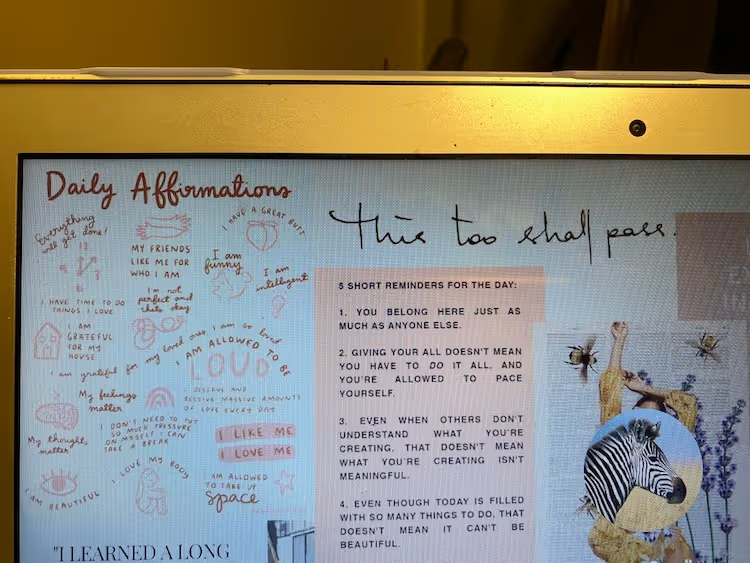
After she closed the app, we were back to her cool screensaver, a collage she created about a year ago (today’s blog photo), and that I have always wanted one. So this was the perfect time to compliment her artwork and let her know that I would love it if she made one for me…my fingers are crossed.
Next, my husband, Peter.
When I asked Peter to show me his desktop, he replied, “How would I get to my desktop?”
“Are you kidding?” I exclaimed!
He was not. He has some system in which he bypasses going to the desktop and instead has three main areas he goes to: 1. Slack 2. personal email and 3. work email. Then within each one, he said he goes to all sorts of other programs such as Hubspot.
All those things are in his toolbar, so he no longer thinks in terms of “desktop.” News to me.
He said his system has been working pretty well for him and didn’t want to change anything.
(The truth is, just last week, he said to me, he is going batty trying to find things in all the different platforms he uses, and he wishes there was someone who could come over and help him find things easier. I want that person as well!)
Learn more about showing our movies in your school or community!
Join Screenagers filmmaker Delaney Ruston MD for our latest Podcast
Learn more about our Screen-Free Sleep campaign at the website!
Our movie made for parents and educators of younger kids
Join Screenagers filmmaker Delaney Ruston MD for our latest Podcast
Register your interest in bringing our new movie to your school or community
I confess, my laptop desktop screen has TOO many folders. That said, there is nothing I want to change right now on it — unless Tessa gifts me a personalized screen saver :)
Take home points from this family experiment:
It was fun.
It was also informative to really look at how and what we were all using on our phones. And I am jazzed to try out the Winno app.
And it was a moment of connection. The best part was talking with Tessa about Notion that led to learning more about her first semester at college.

As we’re about to celebrate 10 years of Screenagers, we want to hear what’s been most helpful and what you’d like to see next.
Please click here to share your thoughts with us in our community survey. It only takes 5–10 minutes, and everyone who completes it will be entered to win one of five $50 Amazon vouchers.
For the next four weeks, I will be offering four ideas that can help tackle screen time in the New Year. Each blog will have a manageable strategy that should not cause your kids to race out of the room. I think these strategies may actually be well-received by them!
I will share some helpful tips around screen time family agreements in February.
This week’s approach is around the idea of “ time to clean the screen.” This should involve everyone in the home and pertains particularly to phones and laptops, but other devices like Chromebooks and iPads are perfect for this as well.
The whole goal is to stay away from remarks about apps that suck up too much time or any other negative remarks but to make it as relaxed as possible. And definitely don’t go digging into anyone’s history tab.
I just did this with my family. It was fun and even led to some unexpected goodness. Let me explain….
I asked Peter and Tessa to join me on the couch with their phones and laptops — and I had mine too.
The first thing they asked me was, “OK, what are we doing and why?”
I responded, “New Year, new screen. We get to look and see if we want to do any house cleaning of apps on our desktops.”
We discussed the “why” a bit more, which was useful.
For Tessa, it turned out she did not have many apps on her phone screen, but they are searchable in the app store. She explained that she originally did this to make them less visible so they would not tempt her. She explained she liked having fewer apps on her phone screens and that there were none right now she wanted to get rid of.
Peter has way more apps on his phone than Tessa or me. When we first started, he said, “I don’t see the need to delete any of them.” But soon enough, he looked at his apps and found a lot he did not know what they were and deleted several of them.
At one point, he said, “Here is my Venmo app. It’s the way I stay in touch with my kids.” Ha, it is true. Our kids were buying the groceries over break, so that app got used more than usual.
What was cool about watching Peter clean his screen was that it reminded me of an app I wanted.
My friends’ son has started a news collating app called Winno, and I had meant to try it out when his parents told us about it, but I had forgotten. So I just downloaded that app, and I’m jazzed to check it out and give a good rating if I like it.
In terms of shedding apps, I don’t have a lot of apps on my phone, but sure enough, I found some I could delete. For instance, I didn’t really need the app for my robo-vacuum cleaner, and I found a video editor app that I never use, plus a few others.
For me, it felt good to shed and organize things a little. It was not “Life-Changing Magic…” a la Marie Kondō, but it was something.
This was the best part of this exercise.
Tessa got a smile on her face and said she wanted to show us “Notion.” She explained how the Notion app has been her main organizational tool at college (she is a Freshman).
She opened up the different tabs to her different classes, and it was fun hearing her say all the ways she uses Notion — such as for note-taking, scheduling, and journaling.
Eventually, Tessa closed out of it and, at the same time, said, “I am really proud of how I have been using it.” I loved hearing her say that.
After she closed the app, we were back to her cool screensaver, a collage she created about a year ago (today’s blog photo), and that I have always wanted one. So this was the perfect time to compliment her artwork and let her know that I would love it if she made one for me…my fingers are crossed.
Next, my husband, Peter.
When I asked Peter to show me his desktop, he replied, “How would I get to my desktop?”
“Are you kidding?” I exclaimed!
He was not. He has some system in which he bypasses going to the desktop and instead has three main areas he goes to: 1. Slack 2. personal email and 3. work email. Then within each one, he said he goes to all sorts of other programs such as Hubspot.
All those things are in his toolbar, so he no longer thinks in terms of “desktop.” News to me.
He said his system has been working pretty well for him and didn’t want to change anything.
(The truth is, just last week, he said to me, he is going batty trying to find things in all the different platforms he uses, and he wishes there was someone who could come over and help him find things easier. I want that person as well!)
I confess, my laptop desktop screen has TOO many folders. That said, there is nothing I want to change right now on it — unless Tessa gifts me a personalized screen saver :)
Take home points from this family experiment:
It was fun.
It was also informative to really look at how and what we were all using on our phones. And I am jazzed to try out the Winno app.
And it was a moment of connection. The best part was talking with Tessa about Notion that led to learning more about her first semester at college.
Sign up here to receive the weekly Tech Talk Tuesdays newsletter from Screenagers filmmaker Delaney Ruston MD.
We respect your privacy.
For the next four weeks, I will be offering four ideas that can help tackle screen time in the New Year. Each blog will have a manageable strategy that should not cause your kids to race out of the room. I think these strategies may actually be well-received by them!
I will share some helpful tips around screen time family agreements in February.
This week’s approach is around the idea of “ time to clean the screen.” This should involve everyone in the home and pertains particularly to phones and laptops, but other devices like Chromebooks and iPads are perfect for this as well.
The whole goal is to stay away from remarks about apps that suck up too much time or any other negative remarks but to make it as relaxed as possible. And definitely don’t go digging into anyone’s history tab.
I just did this with my family. It was fun and even led to some unexpected goodness. Let me explain….
I asked Peter and Tessa to join me on the couch with their phones and laptops — and I had mine too.
The first thing they asked me was, “OK, what are we doing and why?”
I responded, “New Year, new screen. We get to look and see if we want to do any house cleaning of apps on our desktops.”
We discussed the “why” a bit more, which was useful.
For Tessa, it turned out she did not have many apps on her phone screen, but they are searchable in the app store. She explained that she originally did this to make them less visible so they would not tempt her. She explained she liked having fewer apps on her phone screens and that there were none right now she wanted to get rid of.
Peter has way more apps on his phone than Tessa or me. When we first started, he said, “I don’t see the need to delete any of them.” But soon enough, he looked at his apps and found a lot he did not know what they were and deleted several of them.
At one point, he said, “Here is my Venmo app. It’s the way I stay in touch with my kids.” Ha, it is true. Our kids were buying the groceries over break, so that app got used more than usual.
What was cool about watching Peter clean his screen was that it reminded me of an app I wanted.
My friends’ son has started a news collating app called Winno, and I had meant to try it out when his parents told us about it, but I had forgotten. So I just downloaded that app, and I’m jazzed to check it out and give a good rating if I like it.
In terms of shedding apps, I don’t have a lot of apps on my phone, but sure enough, I found some I could delete. For instance, I didn’t really need the app for my robo-vacuum cleaner, and I found a video editor app that I never use, plus a few others.
For me, it felt good to shed and organize things a little. It was not “Life-Changing Magic…” a la Marie Kondō, but it was something.
I've been noticing the ways I can be rude, in person and on my phone. This week I share two recent examples of my own, plus why correcting myself out loud strengthens self-awareness. The talk that follows isn't about your kid. It's about you going first.
READ MORE >
An Oakland library has started lending out sports equipment and games alongside books, so families can borrow gear to use at nearby parks. It is a reminder that borrowing and lending between families is a simple way to fill a summer afternoon without a screen, while quietly modelling generosity and humility. We are out of practice at asking, but the person on the other end is usually glad to help.
READ MORE >
E-readers are convenient, but there are three reasons to lean toward paper books this summer. First, e-readers are screens, and the pull of everything else you could do on one makes it harder to stay immersed. Second, a large meta-analysis found people understand and remember slightly better on paper, especially with longer texts. Third, easy access to endless book samples makes it too tempting to jump ship rather than work through the slower parts, since reading, unlike TikTok, is about delayed gratification.
READ MORE >for more like this, DR. DELANEY RUSTON'S NEW BOOK, PARENTING IN THE SCREEN AGE, IS THE DEFINITIVE GUIDE FOR TODAY’S PARENTS. WITH INSIGHTS ON SCREEN TIME FROM RESEARCHERS, INPUT FROM KIDS & TEENS, THIS BOOK IS PACKED WITH SOLUTIONS FOR HOW TO START AND SUSTAIN PRODUCTIVE FAMILY TALKS ABOUT TECHNOLOGY AND IT’S IMPACT ON OUR MENTAL WELLBEING.